tech-notes-and-questions
Structural Design Patterns
[definition, purpose, use cases, design, example, implementation]
- Structural design patterns are design patterns that focus on how classes and objects are composed to form larger structures while keeping these structures flexible and efficient.
- They help ensure that if one part of a system changes, the entire structure does not need to change as a result.
- Adapter - converts one interface to another, allowing incompatible interfaces to work together
- Bridge - decouples an abstraction from its implementation, enabling them to vary independently
- Composite - composes objects into tree structures to represent part-whole hierarchies
- Decorator - adds responsibilities to an object dynamically without altering its structure
- Facade - provides a simplified interface to a complex system of classes
- Flyweight - reduces memory usage by sharing common parts of objects, making large numbers of fine-grained objects more efficient
- Proxy - controls access to another object, providing additional functionality like lazy initialization or security
1. Adapter Pattern
Definition
- A pattern that allows two incompatible interfaces to work together.
- It’s often used when a class you need to use has the right functionality but the wrong interface.
- The adapter acts as a wrapper between two objects, translating requests or data between them, so they can communicate.
Purpose
This is helpful when you have a legacy system or an external library that doesn’t match your application’s interfaces.
Use cases
1. Testing and Mocking
- Scenario: When writing unit tests, you may want to mock an external service or component that has a complex interface.
- Solution: An adapter can simplify the interface of the external service, making it easier to create mock implementations for testing purposes.
2. Communication Protocols
- Scenario: You need to support multiple communication protocols (e.g., HTTP, WebSocket, FTP) in a system.
- Solution: You can create adapters for each protocol, enabling your system to handle different protocols via a unified interface.
3. Third-Party Library Integration
- Scenario: A third-party library offers powerful functionality, but its API is different from what your application expects.
- Solution: An adapter can be used to convert the third-party library’s interface into one that your application can easily interact with, maintaining loose coupling between your code and the library.
Design
Adapteeinterface: The existing interface that needs adapting.Targetinterface: Defines the domain-specific interface that the client uses.Adapterclass: The class that implements the target interface and translates the requests from the target to the adaptee.
Example
Imagine you have an application that works with AudioPlayer, but now you need to integrate a VideoPlayer.
Instead of modifying the existing AudioPlayer class,
you can create an adapter for VideoPlayer to work with AudioPlayer without altering the original structure.
Implementation
- Define the
Targetinterface (the new interface your client expects)
interface AdvancedMediaPlayer {
    void play(String audioType, String fileName);
}
- Create the
Adaptee(The class that needs to be adapted)
class LegacyMediaPlayer {
    void playMp4(String fileName) {
        System.out.println("Playing mp4 file: " + fileName);
    }

    void playVlc(String fileName) {
        System.out.println("Playing vlc file: " + fileName);
    }
}
- Create the
AdapterClass - The adapter class implements theAdvancedMediaPlayerinterface and uses theLegacyMediaPlayerto provide the functionality.
class MediaAdapter implements AdvancedMediaPlayer {
    LegacyMediaPlayer legacyMediaPlayer;

    public MediaAdapter(String audioType) {
        if (audioType.equalsIgnoreCase("vlc")) {
            legacyMediaPlayer = new LegacyMediaPlayer();
        } else if (audioType.equalsIgnoreCase("mp4")) {
            legacyMediaPlayer = new LegacyMediaPlayer();
        }
    }

    @Override
    void play(String audioType, String fileName) {
        if (audioType.equalsIgnoreCase("vlc")) {
            legacyMediaPlayer.playVlc(fileName);
        } else if (audioType.equalsIgnoreCase("mp4")) {
            legacyMediaPlayer.playMp4(fileName);
        }
    }
}
Clientcode that uses theAdapter
public class AudioPlayer implements  AdvancedMediaPlayer {
    MediaAdapter mediaAdapter;

    @Override
    void play (String fileType, String fileName) {
        // Playing mp3 directly
        if (audioType.equalsIgnoreCase("mp3")) {
            System.out.println("Playing mp3 file: " + fileName);
        }
        // Use adapter to play other file formats
        else if (audioType.equalsIgnoreCase("vlc") || audioType.equalsIgnoreCase("mp4")) {
            mediaAdapter = new MediaAdapter(audioType);
            mediaAdapter.play(audioType, fileName);
        } else {
            System.out.println("Invalid media type: " + audioType + " format not supported");
        }
    }
}
- Testing the Adapter Pattern
public static void main (String[] args) {
    AudioPlayer audioPlayer = new AudioPlayer();

    audioPlayer.play("mp3", "song.mp3");   // Playing mp3 file: song.mp3
    audioPlayer.play("mp4", "video.mp4");  // Playing mp4 file: video.mp4
    audioPlayer.play("vlc", "movie.vlc");  // Playing vlc file: movie.vlc
    audioPlayer.play("avi", "film.avi");   // Invalid media type: avi format not supported
}
</br>
2. Bridge Pattern
Definition
A design pattern that separates an abstraction from its implementation, allowing the two to vary independently.
Purpose
This is useful when you want to avoid a permanent binding between an abstraction and its implementation.
Use cases
1. UI Frameworks
- In graphical user interface (GUI) frameworks, the abstraction (e.g., buttons, sliders) can be separated from their implementations (e.g., different operating systems or platforms).
- This allows the same UI elements to work across multiple platforms without duplicating code.
2. Database Access Layers
- When working with multiple database systems (e.g., MySQL, PostgreSQL), the Bridge pattern allows you to define a generic data access interface while implementing the specific details for each database system separately.
3. Payment Processing Systems
- In e-commerce applications, different payment methods (credit cards, PayPal, cryptocurrencies) can be handled through a common interface, where the implementation can vary based on the payment provider.
Design
Abstraction: The high-level interface that defines the abstraction.Implementor: The interface that defines the implementation part.RefinedAbstraction: A concrete implementation of the abstraction.ConcreteImplementor: A concrete implementation of the implementor interface.
Example
Let’s consider a simple example involving shapes and colors. Shapes don’t know how to color themselves.
Implementation
- Define the
ImplementorInterface
interface Color {
    void applyColor();
}
- Create
Concrete Implementors
class RedColor implements Color {
    @Override
    public void applyColor() {
        System.out.println("Applying red color.");
    }
}
class GreenColor implements Color {
    @Override
    public void applyColor() {
        System.out.println("Applying green color.");
    }
}
- Define the Abstraction
abstract class Shape {
    protected Color color;

    protected Shape(Color color) {
        this.color = color;
    }

    abstract void draw();
}
- Create
Refined Abstractions
class Circle extends Shape {
    public Circle(Color color) {
        super(color);
    }

    @Override
    void draw() {
        System.out.print("Drawing Circle. ");
        color.applyColor();
    }
}
class Square extends Shape {
    public Square(Color color) {
        super(color);
    }

    @Override
    void draw() {
        System.out.print("Drawing Square. ");
        color.applyColor();
    }
}
Clientcode to demonstrate the usage
public static void main(String[] args) {
        Shape redCircle = new Circle(new RedColor());
        Shape greenSquare = new Square(new GreenColor());

        redCircle.draw(); // Output: Drawing Circle. Applying red color.
        greenSquare.draw(); // Output: Drawing Square. Applying green color.
}
</br>
3. Composite Pattern
Definition
- A design pattern that allows you to compose objects into tree structures to represent part-whole hierarchies.
- This pattern enables clients to treat individual objects and compositions of objects uniformly.
Benefits
- Uniformity: Clients can treat individual objects and compositions uniformly.
- Flexibility: It’s easy to add new components (files or directories) without changing existing code.
- Simplified Client Code: Clients can work with complex tree structures more easily.
Purpose
When you want to create a tree structured to composition of classes, while treating the individual objects and the composition uniformly.
Use cases
Design
- Component: An interface or abstract class for all objects in the composition.
- Leaf: Represents leaf nodes in the composition, which do not have any children.
- Composite: Represents a group of Leaf nodes and can have children.
Example
Let’s create a file system example where directories can contain files and other directories.
Implementation
- Define the
Component Interface
interface FileSystemComponent {
    void showDetails();
}
- Create
Leaf Class
class File implements FileSystemComponent {
    private String name;

    public File(String name) {
        this.name = name;
    }

    @Override
    public void showDetails() {
        System.out.println("File: " + name);
    }
}
- Create
Composite Class
class Directory implements FileSystemComponent {
    private String name;
    private List<FileSystemComponent> components = new ArrayList<>();

    public Directory(String name) {
        this.name = name;
    }

    public void addComponent(FileSystemComponent component) {
        components.add(component);
    }

    public void removeComponent(FileSystemComponent component) {
        components.remove(component);
    }

    @Override
    public void showDetails() {
        System.out.println("Directory: " + name);
        for (FileSystemComponent component : components) {
            component.showDetails();
        }
    }
}
Clientcode to demonstrate the usage
public static void main(String[] args) {
        FileSystemComponent file1 = new File("File1.txt");
        FileSystemComponent file2 = new File("File2.txt");

        Directory directory1 = new Directory("Directory1");
        directory1.addComponent(file1);
        directory1.addComponent(file2);

        FileSystemComponent file3 = new File("File3.txt");

        Directory directory2 = new Directory("Directory2");
        directory2.addComponent(directory1);
        directory2.addComponent(file3);

        // Display the file system structure
        directory2.showDetails();

        // Output-------
        /*
                Directory: Directory2
                    Directory: Directory1
                    File: File1.txt
                    File: File2.txt
                    File: File3.txt
         */
    }
</br>
4. Decorator Pattern
Definition
Purpose
Use cases
Design
Example
Implementation
</br>
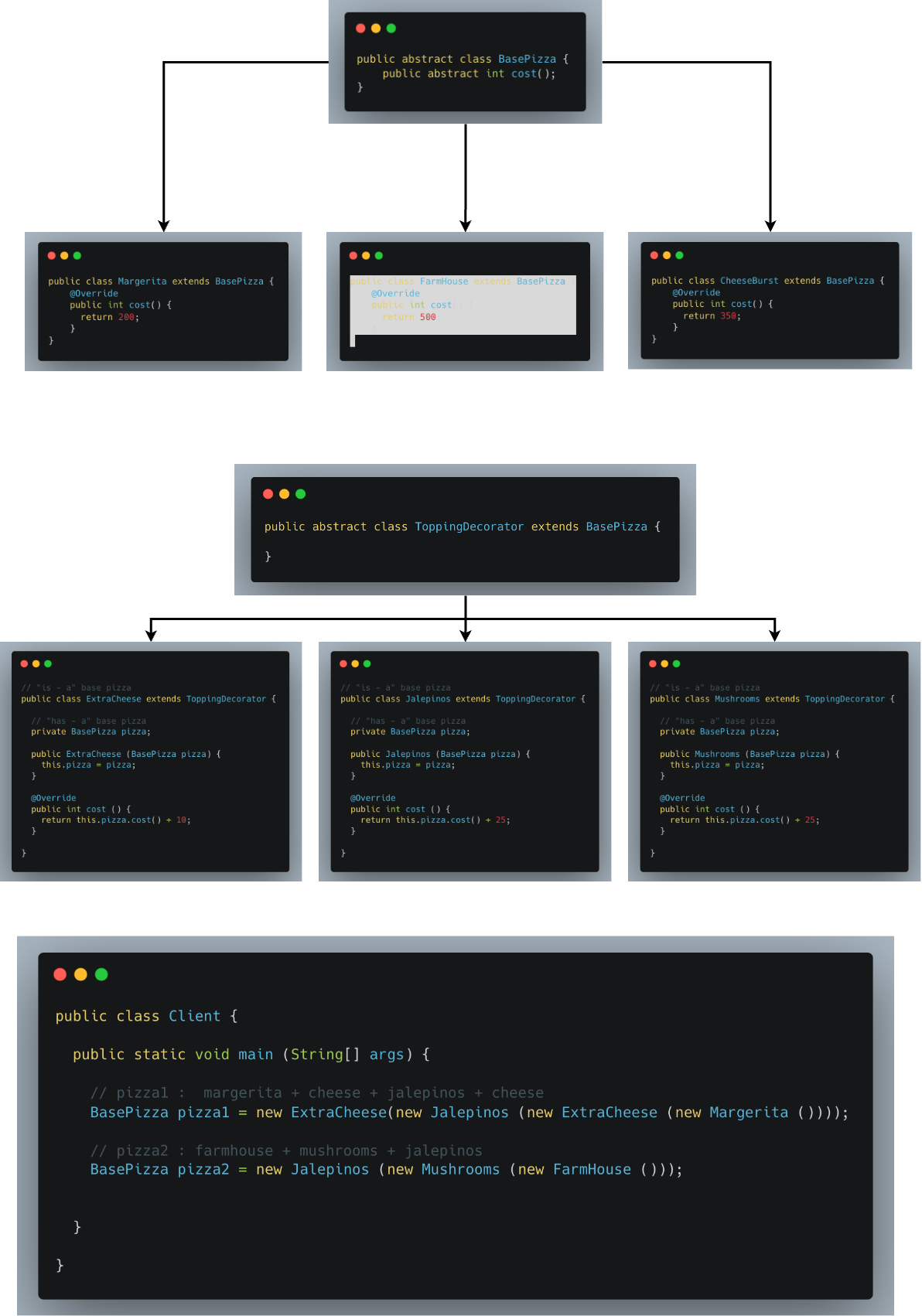
Purpose: Dynamically adds responsibilities to objects by wrapping them in additional functionality without altering the object itself. It provides an alternative to subclassing for extending behavior.
Application: Adding additional features (e.g., scrollbars or borders) to GUI components.
Example: Say you want to take an order for a pizza, with many possible combinations of toppings. Creating subclass to superclass Pizza for each combination would create Class Explosion. So we create a Decorative Layer on top that could accommodate multiple combinations but return the same class ultimately. This decorating layer will have both ‘has-a’ & ‘is-a’ relationships with the base class.
</br>
5. Facade Pattern
Definition
- A pattern provides a simplified interface to a complex subsystem.
- It defines a higher-level interface that makes the subsystem easier to use.
Benefits
- Reduces complexity for the client code.
- Decouples the client from the subsystem, promoting loose coupling.
- Makes it easier to use a subsystem as the client only needs to know about the facade.
Purpose
This pattern is particularly useful when you want to reduce the complexity of interacting with multiple classes or libraries.
Use cases
Design
FacadeClass: This class provides a simplified interface to the complex subsystem.SubsystemClasses: These are the classes that the Facade interacts with. They contain the actual business logic.
Example
Let’s create an example for a home theater system that consists of several components: a DVD player, a projector, and a sound system.
Implementation
- Create
Subsystem Classes
class DVDPlayer {
    public void on() {
        System.out.println("DVD Player is ON");
    }
    public void play(String movie) {
        System.out.println("Playing movie: " + movie);
    }
    public void stop() {
        System.out.println("DVD Player stopped");
    }
    public void off() {
        System.out.println("DVD Player is OFF");
    }
}
class Projector {
    public void on() {
        System.out.println("Projector is ON");
    }
    public void setInput(String input) {
        System.out.println("Projector input set to: " + input);
    }
    public void off() {
        System.out.println("Projector is OFF");
    }
}
class SoundSystem {
    public void on() {
        System.out.println("Sound System is ON");
    }
    public void setVolume(int level) {
        System.out.println("Sound System volume set to: " + level);
    }
    public void off() {
        System.out.println("Sound System is OFF");
    }
}
- Create the
Facade Class
class HomeTheaterFacade {
    private DVDPlayer dvdPlayer;
    private Projector projector;
    private SoundSystem soundSystem;

    public HomeTheaterFacade(DVDPlayer dvdPlayer, Projector projector, SoundSystem soundSystem) {
        this.dvdPlayer = dvdPlayer;
        this.projector = projector;
        this.soundSystem = soundSystem;
    }

    public void watchMovie(String movie) {
        System.out.println("Get ready to watch a movie...");
        projector.on();
        projector.setInput("DVD");
        soundSystem.on();
        soundSystem.setVolume(10);
        dvdPlayer.on();
        dvdPlayer.play(movie);
    }

    public void endMovie() {
        System.out.println("Shutting movie theater down...");
        dvdPlayer.stop();
        dvdPlayer.off();
        soundSystem.off();
        projector.off();
    }
}
Clientcode to demonstrate the usage
public static void main(String[] args) {
        DVDPlayer dvdPlayer = new DVDPlayer();
        Projector projector = new Projector();
        SoundSystem soundSystem = new SoundSystem();

        HomeTheaterFacade homeTheater = new HomeTheaterFacade(dvdPlayer, projector, soundSystem);

        homeTheater.watchMovie("Inception");
        homeTheater.endMovie();
}
</br>
6. Flyweight Pattern
Definition
A pattern that aims to minimize memory usage by sharing common data among multiple objects.
Purpose
- This is especially useful when dealing with a large number of similar objects.
- Instead of creating separate instances for each object, you can reuse existing instances.
Use cases
Design
Flyweightclass: The shared object that contains the intrinsic state (common data).Intrinsic State: The part of the state that can be shared across multiple objects.Extrinsic State: The part of the state that cannot be shared and is passed to theFlyweightobject.
Example
Let’s create a simple example of a text editor that manages different font styles.
Implementation
- Define the
FlyweightInterface
interface Font {
    void display(int size, String color);
}
- Create
Concrete FlyweightClasses
class ConcreteFont implements Font {
    private String fontType; // Intrinsic state

    public ConcreteFont(String fontType) {
        this.fontType = fontType;
    }

    @Override
    public void display(int size, String color) {
        System.out.println("Font: " + fontType + ", Size: " + size + ", Color: " + color);
    }
}
- Create a
Flyweight Factory
class FontFactory {
    private static final HashMap<String, Font> fontMap = new HashMap<>();

    public static Font getFont(String fontType) {
        Font font = fontMap.get(fontType);
        if (font == null) {
            font = new ConcreteFont(fontType);
            fontMap.put(fontType, font);
            System.out.println("Creating new font: " + fontType);
        }
        return font;
    }
}
- Client code to demonstrate the usage
public static void main(String[] args) {
        Font font1 = FontFactory.getFont("Arial");
        font1.display(12, "Red");

        Font font2 = FontFactory.getFont("Arial");
        font2.display(14, "Blue");

        Font font3 = FontFactory.getFont("Times New Roman");
        font3.display(16, "Green");

        // Both font1 and font2 point to the same Arial font instance
        System.out.println("font1 == font2: " + (font1 == font2));
}
</br>
7. Proxy Pattern
Definition
- A design pattern that provides an object representing another object.
- It acts as a surrogate or placeholder to control access to that object, allowing for additional functionality, such as lazy initialization, access control, logging, or caching.
Purpose
Use cases
Design
Subject: An interface that defines the common interface for the RealObject and the Proxy.RealObject: The actual object that the proxy represents and delegates requests to.Proxy: The class that implements the Subject interface and contains a reference to the RealObject. It controls access to the RealObject.
Example
Let’s illustrate the Proxy Design Pattern with a simple example involving image loading.
Implementation
- Create the
Subject Interface
public interface Image {
    void display();
}
- Implement the
RealObject
public class RealImage implements Image {
    private String filename;

    public RealImage(String filename) {
        loadImageFromDisk();
        this.filename = filename;
    }

    private void loadImageFromDisk() {
        System.out.println("Loading " + filename);
    }

    @Override
    public void display() {
        System.out.println("Displaying " + filename);
    }
}
- Create the
Proxy
public class ProxyImage implements Image {
    private RealImage realImage;
    private String filename;

    public ProxyImage(String filename) {
        this.filename = filename;
    }

    @Override
    public void display() {
        if (realImage == null) {
            realImage = new RealImage(filename);
        }
        realImage.display();
    }
}
Clientcode to demonstrate the usage
public static void main(String[] args) {
        Image image1 = new ProxyImage("image1.jpg");
        Image image2 = new ProxyImage("image2.jpg");

        // Image will be loaded from disk
        image1.display();
        System.out.println();

        // Image will not be loaded from disk, already loaded
        image1.display();
        System.out.println();

        // Image will be loaded from disk
        image2.display();
    }